Case Study
Gamma — AI-Powered Thumbnail Design System
Built a multi-agent AI pipeline that automated 95% of my thumbnail design workflow — from writing 75 prompts by hand to reviewing outputs and pushing creative boundaries. 3 AI systems, a Design Brain, and a visual command center called Miss Minutes.
Client
Role
Timeline
Industry
I design thumbnails for a Hindi edutainment app with more than 18 content categories. Each one needs to be perfectly designed so that user understand that just by seeing it and click over it.
2000+
Prompts Submitted
500+
Thumbnails Processed
~15 min
Brief to generation (15 Thumbnail Batch)
The Problem
I had to design 15 thumbnails a day. So for many thumbnails I needed Ideas and AI generated images, for that I had trained custom GPTs but they were very time consuming and not consistent. Each one needed a Midjourney/Nano-banana prompt that's 500-2000 characters of precise instructions — hex codes, camera specs, lighting setups, facial expressions tuned to Indian cultural context. I was writing every single one by hand or help through different AIs. Hours of repetitive work that kept me from actual creative thinking, without any consistency and real time for creativity.
The prompts couldn't be generic. Each category (Finance, Astrology, Scams, Health, Career) has different visual rules, different emotions, different color palettes. And every title needed 5 distinct directions to test which performs best. The math was brutal: 8 thumbnails × 5 directions = 40 prompts. Every day.
The Solution
I decided to automate the whole process from reading the brief to final thumbnail, I will have to just give my creative inputs. So that I can be 5x more productive in just some AI costs.
Tech Stack
- Claude Code
- Figma
- Midjourney
- Nano Banana Pro API
- Python
- Javascript
- Google Cloud Console
V1 — First Automation
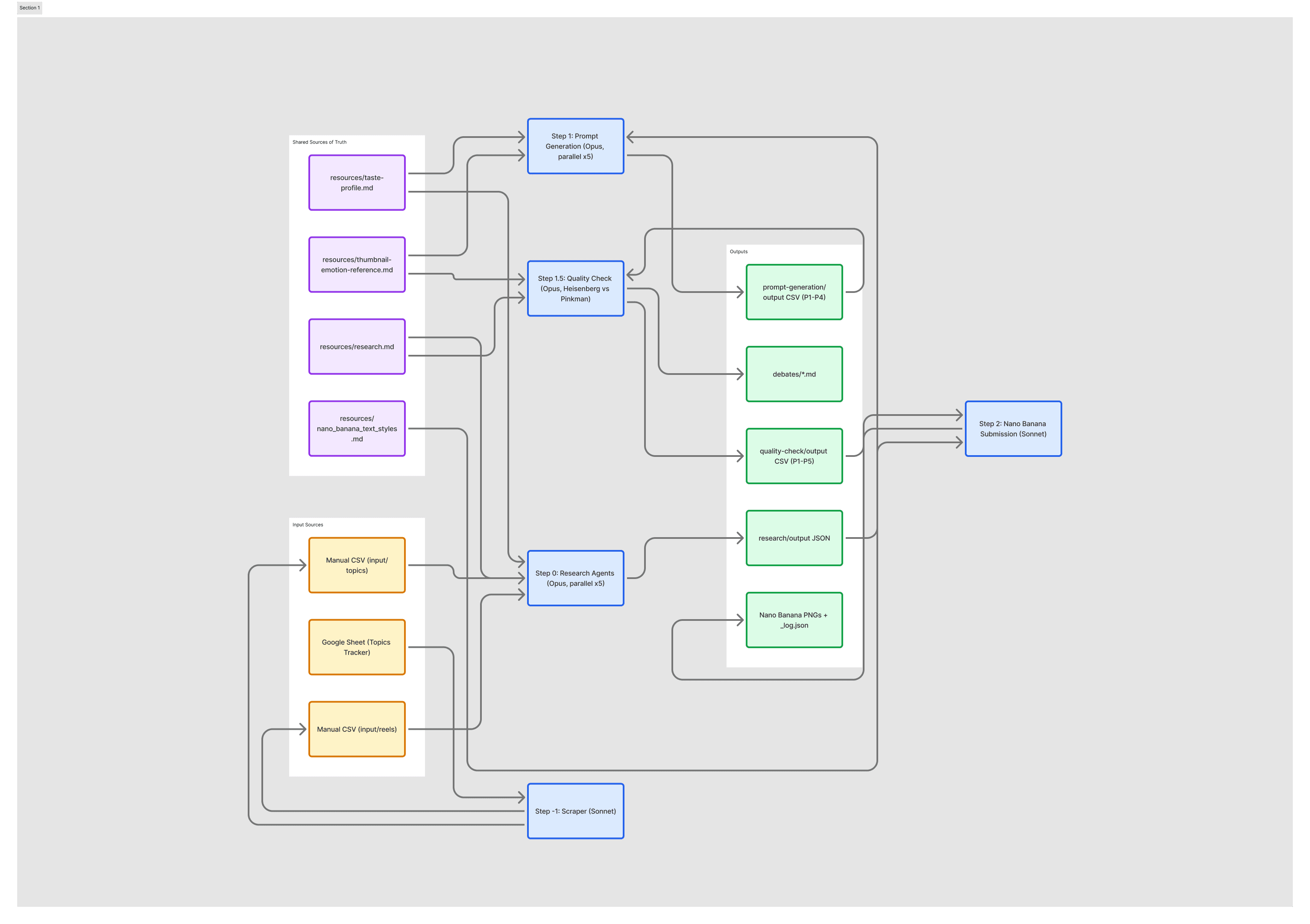
Daily I used to create a CSV with all Briefs with titles, Then I would give that to my automation agents in Claude Code Terminal where I had Two Agents-
Prompt Generation Agent - It was an instructed agent design on Claude Code to generate four different kinds of prompts for each brief.
Prompt Submission Agent - It was an agent which had some JavaScript and Python scripts to submit the prompt on the Chrome on Midjourney because Midjourney doesn't have an API so it was an automated process done in batches without any interruption.
In the end I would get generated images of all the prompts for different titles.
~30%
Submission automated, but prompts were generic and quality varied wildly
V2 — Adding Intelligence
The prompts were bad because the AI had no context. So I added a Research Agent that studies competitors, analyzes what works in each category, and identifies what's overused before writing anything. Then I split prompt generation into 4 distinct visual directions — Human Portrait, Object Still Life, Illustration, and Movie Poster — giving me real options instead of hoping one random direction would be good.
Then the breakthrough: Two AI critics that review every prompt before it ships. One demands technical precision (exact hex codes, camera specs, lighting names). The other asks "would someone actually stop scrolling for this?" They debate, disagree, and arrive at something better than either could alone.
~80%
Research + 4 directions + quality debate. Creative work, not busywork.
V3 — The Full System
Connected my Google Sheets workflow so briefs flow in automatically — no more tab-switching or copy-pasting. I just ask "what's remaining today?" and the system tells me. Built a Design Brain that knows my taste, my moodboard, and what actually performs well — every agent consults it before doing anything. Integrated three AI systems (Claude, Codex, Gemini) that delegate work to each other like a team. And built Miss Minutes — a visual command center to control everything from one screen.
Added Google Gemini API for Nano Banana so my Browser Automation was over. Everything was generated in my terminal and stored in my PC.
~95%
My job now: creativity, ideation, and better taste. Everything else is handled.
The Design Brain
I needed the system to stop generating "good enough" and start generating "this is exactly my taste." So I built a Design Brain — a mini AI trained on my moodboard, my visual preferences, and real performance data. It knows what makes a good design and what doesn't. Every generation agent consults the Design Brain before writing a single prompt.
It's like having a senior art director sitting next to every agent. "This direction works for Finance thumbnails. This expression is wrong for Scam content. This color palette is overused — try something fresh." The Design Brain is why V3 output is fundamentally better than V2. The agents don't just follow rules — they have creative judgment.
Design Brain
The difference between automation and intelligence
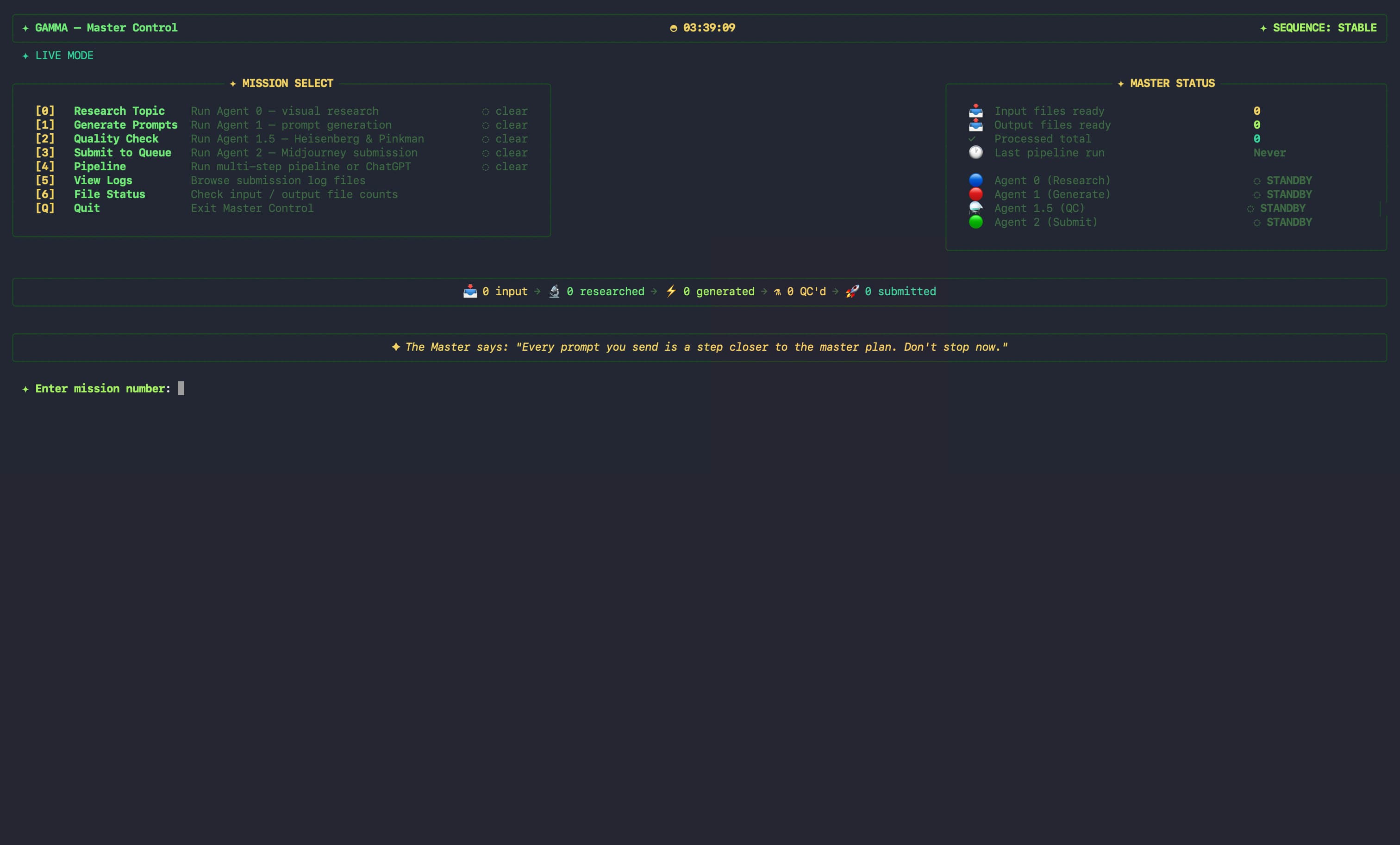
Miss Minutes - Gamma
Named after Miss Minutes from Loki. A terminal-based visual interface that gives me a dashboard to control the entire pipeline. I can see every agent's status, launch teams in parallel, monitor what's processing, and manage the whole system from one screen. It turned a collection of scripts into a product.
The Two-Critic System
Precision alone creates sterile, unrelatable output. Gut feel alone creates inconsistent, unpredictable results. So I built two AI critics with fundamentally different perspectives:
The first demands exact specifications — hex codes, facial muscle descriptions, complete camera setups, named lighting sources. If a detail is vague, it gets rejected. The second asks a different question entirely: "would a real person stop scrolling for this?" It checks if the Indian context feels authentic, if the face tells a story, if it matches my visual language.
They debate. Sometimes they agree, sometimes they clash. The prompt either gets approved, sent back for revision, or lands on a compromise. Then they collaborate on a fifth "Best Of" prompt — the strongest concept from all four directions, enhanced with my taste profile. This debate system was the single biggest quality leap in the entire project.
3 AIs, One Design Studio
While developing this whole project, I integrated Codex and Gemini in this project so that for research I can use Gemini because it is good at Google search and I can use Codex when my Claude tokens are run out.
So anytime any AI can be called out and that AI can be called out by other agents too.
Design System Thinking, Applied to AI
I formalized my visual taste, emotion vocabulary, and color system into living documents that every agent follows — the same way brand guidelines work for a human design team. Category colors, typography rules, texture libraries, cultural safeguards. Every agent reads these before doing anything. The result: consistent output at scale, with my personal aesthetic running through every single prompt.
Results
60+
Sessions Completed
18+
Categories Covered
5
AI Systems Integrated
- 15 thumbnails from brief to Midjourney submission in ~15 minutes — fully automated. Used to take hours.
- Every prompt follows the same quality standard — correct category colors, correct emotions, my taste profile baked in.
- The debate system catches issues I would have missed — wrong emotion for the category, overused palette, generic composition.
- Can process 15 thumbnails in one session without quality dropping. Scale without compromise.
- My job went from writing 75 prompts to reviewing outputs and pushing creative boundaries.
What I Learned
- Systems thinking beats prompt engineering. A single great prompt doesn't scale. A system of agents with clear rules and quality gates does.
- Constraints create quality. Color rules, variety enforcement, and cultural safeguards eliminated entire classes of bad output.
- Conflict produces refinement. The two-critic debate was the biggest quality leap — two perspectives catching each other's blind spots.
- Formalize your taste. Turning my moodboard into a structured document meant every agent could reference it consistently.
- Non-developers can build complex systems. I designed this entire pipeline through conversation. My contribution was the design system, workflow architecture, and quality rules.
I didn't just prompt AI — I designed the system that prompts AI. Gamma is what happens when a designer thinks in pipelines, not pixels.